🧭 Executive summary
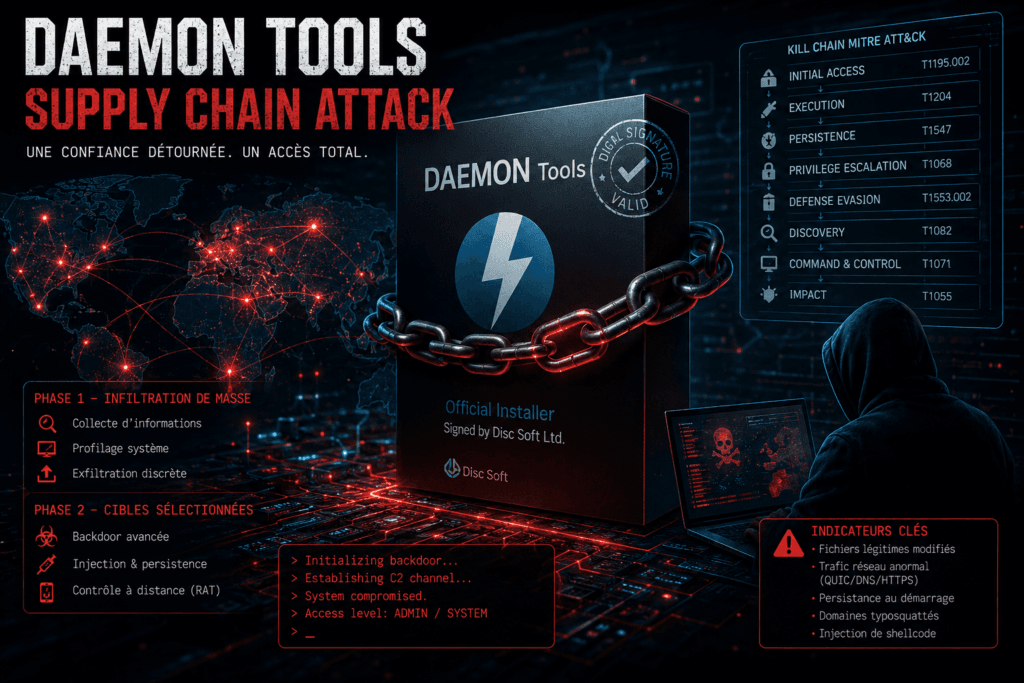
La compromission de DAEMON Tools représente une attaque supply chain multi-étapes sophistiquée, combinant :
- Compromission du processus de distribution
- Exécution avec signature légitime
- Profiling massif suivi d’une sélection ciblée
- Déploiement conditionnel de charges avancées
On est face à un modèle hybride mêlant opération opportuniste suivie par une exploitation ciblée (type APT).
🧬 Kill chain détaillée
1. Initial Access (TA0001)
Vecteur : Trusted Relationship / Supply Chain
- Téléchargement depuis le site officiel
- Installateur compromis mais signé
- Aucun besoin de phishing ou interaction suspecte
📌 MITRE :
T1195.002– Supply Chain Compromise: Compromise Software Supply Chain
2. Execution (TA0002)
- Exécution classique de l’installateur
- Lancement automatique des composants modifiés :
DTHelper.exeDiscSoftBusServiceLite.exeDTShellHlp.exe
📌 MITRE :
T1204– User ExecutionT1059– Command and Scripting Interpreter (dans les phases avancées)
3. Persistence (TA0003)
- Intégration dans les services du logiciel
- Exécution au démarrage système
- Modification du flux d’initialisation (CRT startup hook)
📌 MITRE :
T1547– Boot or Logon Autostart ExecutionT1574– Hijack Execution Flow
4. Privilege Escalation (TA0004)
- Héritage direct des privilèges élevés du logiciel
- Possibilité d’interaction kernel-level
📌 MITRE :
T1068– Exploitation for Privilege Escalation- (ou implicite via contexte admin)
5. Defense Evasion (TA0005)
- Signature numérique valide
- Utilisation de binaires légitimes
- Faible footprint initial
📌 MITRE :
T1553.002– Code SigningT1036– Masquerading
6. Discovery (TA0007)
Phase critique de tri des victimes :
- Inventaire système
- Liste des processus
- Logiciels installés
- Environnement réseau
📌 MITRE :
T1082– System Information DiscoveryT1057– Process DiscoveryT1016– Network Discovery
7. Command & Control (TA0011)
Infrastructure flexible :
- HTTP / HTTPS
- DNS
- QUIC (HTTP/3)
- TCP / UDP fallback
📌 MITRE :
T1071– Application Layer ProtocolT1095– Non-Application Layer ProtocolT1572– Protocol Tunneling
8. Lateral Movement / Impact (TA0008 / TA0040)
Uniquement pour cibles sélectionnées :
- Déploiement RAT avancé
- Injection de shellcode
- Pivot potentiel réseau
📌 MITRE :
T1021– Remote ServicesT1055– Process Injection
🎯 Architecture de l’attaque (logique opérationnelle)
Victime → Installateur signé → Backdoor stage 1
        → Profiling système → Exfiltration
        → Filtrage côté attaquant
            → [low value] abandon
            → [high value] stage 2 (RAT avancé)
C’est un modèle typique des campagnes modernes :
- scaling massif
- coût réduit
- impact ciblé élevé
Les attaquants vise clairement le ROI élevé !
🔎 IOCs (indicateurs de compromission)
📁 Fichiers suspects
DTHelper.exe(modifié)DiscSoftBusServiceLite.exe(modifié)DTShellHlp.exe(modifié)
À surveiller :
- Hash incohérent vs version officielle
- Comportement réseau anormal
🌐 Réseau
- Connexions vers domaines récents / typosquattés
- Trafic QUIC inhabituel
- DNS tunneling possible
Patterns :
- Beaconing faible fréquence
- Fallback multi-protocoles
🖥️ Comportement endpoint
- Processus DAEMON Tools générant du trafic externe
- Exécution au boot non attendue
- Injection mémoire
🛡️ Détection SOC
🔍 Use cases SIEM / EDR
1. Détection comportementale
- Logiciel de montage ISO → trafic externe inhabituel
- Service système → communication Internet
Règle type :
IF process_name IN (daemon_tools_processes)
AND outbound_connection = TRUE
AND destination NOT trusted
THEN alert
2. Détection C2
- Trafic QUIC hors navigateur
- DNS volumétrique anormal
Corrélation :
- Process + protocole inhabituel
3. Détection persistance
- Nouveaux services liés à DAEMON Tools
- Modification startup registry
4. Détection post-exploitation
- Injection mémoire (
T1055) - Processus enfants suspects
🧪 Threat hunting (hypothèses)
Hypothèse 1
Un logiciel signé génère du trafic réseau anormal
Hypothèse 2
Un processus légitime agit comme loader
Hypothèse 3
Beaconing faible fréquence depuis poste utilisateur
🔐 Recommandations défensives avancées
🧱 1. Zero Trust applicatif
- Ne pas faire confiance à :
- Signature
- Editeur
- Source officielle
🔬 2. Vérification d’intégrité
- Validation de hash indépendante
- Comparaison multi-sources
📡 3. Monitoring réseau avancé
- Inspection QUIC
- Détection DNS tunneling
- Profiling comportemental
🧠 4. EDR orienté comportement
- Détection post-exécution
- Analyse mémoire
- Corrélation multi-événements
🏗️ 5. Sécurisation supply chain interne
- CI/CD hardening
- Code signing sécurisé (HSM)
- Audit pipeline build
⚔️ Lecture offensive : pourquoi ça marche si bien
Cette attaque est efficace car elle exploite :
✔️ Le biais de confiance
Un logiciel connu = perçu comme sûr
✔️ Le blind spot des EDR
Activité légitime en apparence
✔️ L’économie d’échelle
1 compromission → milliers de victimes
✔️ Le filtrage intelligent
Seules les cibles intéressantes sont exploitées
📌 Conclusion stratégique
L’attaque DAEMON Tools marque une évolution claire : les attaquants ne cherchent plus à entrer dans les systèmes … ils se font inviter en abusant de la confiance.
Cela impose un changement radical :
- Passer de la confiance à la vérification
- Passer de la prévention à la détection
- Passer de l’événement à l’étude de comportement
🚀 Mapping rapide MITRE
| Phase | Technique |
|---|---|
| Initial Access | T1195.002 |
| Execution | T1204 |
| Persistence | T1547 |
| Defense Evasion | T1553.002 |
| Discovery | T1082 |
| C2 | T1071 |
| Lateral Movement | T1021 |
🛡️ Règles Sigma (détection générique EDR / SIEM)
🔎 Détection 1 – Processus DAEMON Tools avec trafic réseau anormal
title: DAEMON Tools Suspicious Network Activity
id: 9f2a7c6b-1d23-4f1a-8d2e-daemon-net-001
status: experimental
description: Detects DAEMON Tools processes initiating suspicious outbound connections
author: yourname
logsource:
  category: network_connection
  product: windows

detection:
  selection:
    Image|endswith:
      - '\DTHelper.exe'
      - '\DiscSoftBusServiceLite.exe'
      - '\DTShellHlp.exe'
    Initiated: true

  filter_legit:
    DestinationHostname|endswith:
      - '.microsoft.com'
      - '.windowsupdate.com'

  condition: selection AND NOT filter_legit

fields:
  - Image
  - DestinationIp
  - DestinationHostname
  - DestinationPort

level: high
🔎 Détection 2 – Persistance suspecte via services
title: Suspicious Service Creation DAEMON Tools
id: daemon-persistence-002
status: experimental
logsource:
  category: registry_event
  product: windows

detection:
  selection:
    TargetObject|contains: 'SYSTEM\\CurrentControlSet\\Services'
    Details|contains:
      - 'DTHelper'
      - 'DiscSoftBus'
      - 'DTShell'

  condition: selection

level: high
🔎 Détection 3 – Exécution au boot anormale
title: DAEMON Tools Boot Execution Anomaly
id: daemon-boot-003
logsource:
  category: process_creation
  product: windows

detection:
  selection:
    Image|endswith:
      - '\DTHelper.exe'
      - '\DiscSoftBusServiceLite.exe'
    ParentImage|endswith:
      - '\wininit.exe'
      - '\services.exe'

  condition: selection

level: medium
🔎 Détection 4 – QUIC / protocole anormal
title: Suspicious QUIC Traffic Non-Browser
id: quic-anomaly-004
logsource:
  category: network_connection

detection:
  selection:
    DestinationPort: 443
    Protocol: UDP

  filter_browser:
    Image|contains:
      - 'chrome.exe'
      - 'msedge.exe'
      - 'firefox.exe'

  condition: selection AND NOT filter_browser

level: high
🛡️ Règles Splunk
🔎 Use Case 1 – Processus DAEMON Tools → trafic externe
index=windows_logs sourcetype=Sysmon:NetworkConnect
(Image="*DTHelper.exe" OR Image="*DiscSoftBusServiceLite.exe" OR Image="*DTShellHlp.exe")
| stats count by Image, DestinationIp, DestinationPort
| where DestinationIp!="127.0.0.1"
🔎 Use Case 2 – Beaconing faible fréquence
index=network_logs
| bucket _time span=5m
| stats count by src_ip, dest_ip, _time
| where count < 5
👉 À coupler avec une whitelist pour réduire le « bruit ».
🔎 Use Case 3 – DNS suspect / typosquatting
index=dns_logs
| stats count by query
| where len(query) > 20
| sort -count
🔎 Use Case 4 – Service suspect
index=windows_logs EventCode=7045
(ServiceName="*DTHelper*" OR ServiceName="*DiscSoft*" OR ServiceName="*DTShell*")
🔎 Use Case 5 – QUIC hors navigateur
index=network_logs
protocol=udp dest_port=443
| search NOT (process_name="chrome.exe" OR process_name="msedge.exe" OR process_name="firefox.exe")
🛡️ Règles YARA
🧪 YARA 1 – Détection générique backdoor DAEMON Tools
rule DAEMON_Tools_Backdoor_Generic
{
    meta:
        description = "Detects modified DAEMON Tools binaries"
        author = "yourname"
        date = "2026-05"

    strings:
        $s1 = "DTHelper" ascii wide
        $s2 = "DiscSoftBus" ascii wide
        $s3 = "DTShell" ascii wide
        $s4 = "http://" ascii
        $s5 = "User-Agent" ascii

    condition:
        2 of ($s*) and filesize < 10MB
}
🧪 YARA 2 – Détection RAT (QUIC / multi-protocol)
rule Suspicious_MultiProtocol_RAT
{
    meta:
        description = "Detects RAT with QUIC/DNS/HTTP fallback"
        author = "yourname"

    strings:
        $quic = "quic" nocase
        $http3 = "h3" ascii
        $dns = "dns_query" ascii
        $ua = "Mozilla/5.0" ascii

    condition:
        2 of ($quic, $http3, $dns) and $ua
}
🧪 YARA 3 – Détection injection mémoire
rule Process_Injection_Indicators
{
    meta:
        description = "Detects common injection patterns"

    strings:
        $a1 = "VirtualAllocEx" ascii
        $a2 = "WriteProcessMemory" ascii
        $a3 = "CreateRemoteThread" ascii

    condition:
        all of them
}
🧠 Corrélation SOC (approche avancée)
Pour une détection vraiment efficace, la corrélation multi-signaux est un game-changer.
Exemple logique :
SI
  Processus DAEMON Tools
ET
  Trafic réseau externe
ET
  Domaine inconnu
ALORS
  HIGH ALERT
⚠️ Limites à connaître
- Les signatures facilement contournables
- Le hash changeant
- Le bruit élevé sans tuning
- La dépendance forte au contexte SI
D’où l’importance cruciale :
- ✔ du threat hunting
- ✔ du behavioral detection